
Blog
Choosing Your First 3D Printer: A Beginner’s Guide

Choosing Your First 3D Printer: A Beginner’s Guide
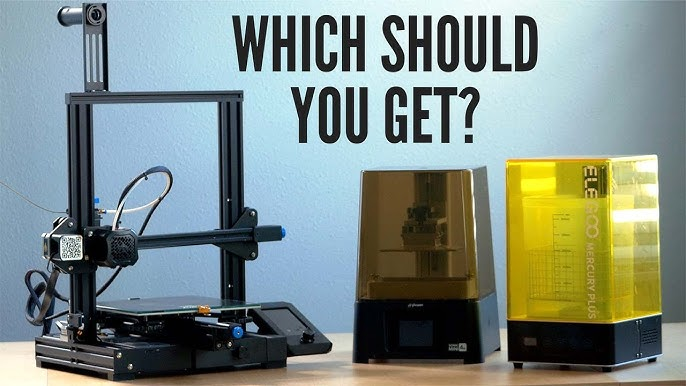
Table of Contents
Toggle3D printing has become more accessible than ever. What was once limited to industrial labs and large companies is now available to hobbyists, students, and small businesses. However, for beginners, choosing the right 3D printer can be confusing due to the wide range of technologies, features, and price points.
This guide is designed to help beginners understand the basics of 3D printing and make an informed decision when purchasing their first 3D printer.
What Is a 3D Printer?
A 3D printer is a machine that creates physical objects from digital 3D models. Unlike traditional manufacturing methods that remove material, 3D printers build objects layer by layer until the final shape is complete.
3D printers are commonly used for:
-
Prototyping and product design
-
Educational projects and research
-
DIY repairs and custom tools
-
Artistic and decorative creations
-
Small-scale manufacturing
How Does 3D Printing Work?
The 3D printing process typically follows these steps:
-
A 3D model is created using design software or downloaded from an online library.
-
Slicing software converts the model into instructions the printer can understand.
-
The file is transferred to the printer via USB, SD card, or Wi-Fi.
-
The printer builds the object layer by layer based on the instructions.
This workflow is easy to learn and does not require advanced technical skills.
Types of 3D Printing Technologies
Understanding the different printing technologies is essential before making a purchase.
FDM (Fused Deposition Modeling)
Best for: Beginners, hobbyists, and education
How it works: Heated plastic filament is extruded through a nozzle and deposited layer by layer.
Advantages
-
Affordable and widely available
-
Easy to use and maintain
-
Large community and strong support
-
Compatible with many materials
-
Ideal for learning fundamentals
Disadvantages
-
Visible layer lines
-
Less detail compared to resin printers
For most beginners, FDM printers are the best starting point.
Resin Printing (SLA / MSLA)
Best for: High-detail models, miniatures, jewelry
How it works: Liquid resin is cured layer by layer using UV light.
Advantages
-
Very high detail and smooth surfaces
-
Excellent for small and intricate parts
Disadvantages
-
Resin handling requires safety precautions
-
Additional post-processing is required
-
Higher operating costs
-
More complex workflow
Resin printers are generally not recommended for beginners unless high detail is the primary goal.
Key Factors to Consider Before Buying
Choosing the right 3D printer depends on your intended use and experience level.
Build Volume (Print Size)
Build volume determines the maximum size of objects you can print.
-
Small build volumes are suitable for miniatures and small parts
-
Medium build volumes offer versatility for most projects
-
Large build volumes are useful for big or complex designs
For beginners, a medium build volume provides the best balance.
Assembly and Setup
3D printers are sold in different assembly states:
-
Fully assembled
-
Semi-assembled
-
DIY kits
Fully or semi-assembled printers are recommended for first-time users, as they reduce setup time and potential errors.
Material Compatibility
Most beginner-friendly printers use PLA filament, which is:
-
Easy to print
-
Environmentally friendly
-
Low-warping
-
Ideal for learning
Advanced materials such as ABS, PETG, and TPU can be explored after gaining experience.
Bed Leveling
Proper bed leveling ensures good first-layer adhesion.
-
Manual leveling requires user adjustment
-
Automatic leveling uses sensors to compensate for uneven surfaces
Automatic bed leveling significantly improves reliability for beginners.
Reliability and Community Support
A printer with a strong user community offers:
-
Troubleshooting help
-
Tutorials and guides
-
Firmware updates
-
Shared print profiles
Well-supported printers reduce frustration and improve learning speed.
Budget Considerations
Entry-Level Printers
Typically priced between $200 and $400, these printers are ideal for beginners. They offer good print quality and essential features without excessive complexity.
Mid-Range Printers
Priced between $400 and $700, these printers offer improved reliability, larger build volumes, and more automation.
Beginners should start with an entry-level or lower mid-range printer and upgrade later if needed.
Essential Features for Beginners
When choosing a printer, look for:
-
Heated print bed
-
Power-loss recovery
-
Quiet motors
-
User-friendly interface
-
Reliable customer support
These features greatly enhance the beginner experience.
Software and File Preparation
Slicing Software
Slicing software converts 3D models into printable instructions. Popular options include:
-
Cura
-
PrusaSlicer
-
OrcaSlicer
Most slicing software is free and well-documented.
3D Models
Beginners do not need to design their own models initially. Many websites offer free models for practice and learning, allowing new users to focus on understanding the printing process.
Common Beginner Mistakes
-
Choosing the cheapest printer without research
-
Ignoring calibration and setup steps
-
Using advanced materials too early
-
Expecting perfect results immediately
-
Skipping safety guidelines
Learning 3D printing takes time and patience.
Final Thoughts
Choosing your first 3D printer is an important step into the world of digital fabrication. By focusing on ease of use, reliability, and strong community support, beginners can avoid common pitfalls and enjoy a smooth learning experience.
Start simple, learn the basics, and upgrade as your skills grow. With the right printer, 3D printing can become a powerful and rewarding tool for creativity and problem-solving.