
Blog
Setting Up Your 3D Printer: Step-by-Step Instructions

Setting Up Your 3D Printer: Step-by-Step Instructions
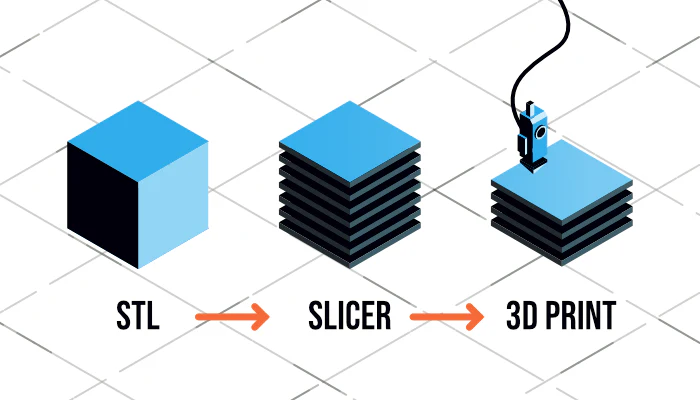
Setting up a 3D printer correctly is one of the most important steps to achieving high-quality and reliable prints. Many beginners face issues not because of the printer itself, but due to improper setup and calibration. A well-configured printer saves time, reduces failed prints, and ensures consistent results.
This guide walks you through the entire setup process step by step, from unboxing your printer to completing your first successful print.
Step 1: Unbox and Inspect the Printer
Before powering on your printer, carefully unpack all components and accessories.
What to Check
-
Printer frame and moving parts
-
Power supply and cables
-
Filament spool
-
Tools included by the manufacturer
-
SD card or USB drive (if provided)
Inspect the printer for visible damage and confirm that all parts listed in the manual are present.
Step 2: Assemble the Printer (If Required)
Some 3D printers come fully assembled, while others require partial assembly.
Common Assembly Tasks
-
Attaching the gantry or vertical frame
-
Installing the print bed
-
Mounting the spool holder
-
Securing the display and control unit
Follow the manufacturer’s instructions closely and avoid overtightening screws, as this can cause misalignment.
Step 3: Position the Printer Correctly
Proper placement is often overlooked but plays a significant role in print quality.
Placement Guidelines
-
Use a stable, flat surface
-
Avoid areas with vibration
-
Keep the printer away from drafts or direct airflow
-
Ensure adequate ventilation
-
Leave enough space for maintenance and filament movement
A stable environment helps maintain consistent printing conditions.
Step 4: Connect Power and Perform Initial Checks
Once the printer is assembled and positioned, connect the power cable and turn it on.
Initial Checks
-
Verify the correct voltage setting (110V or 220V)
-
Ensure the display powers on correctly
-
Test basic movements using the control menu
-
Listen for unusual sounds
If anything seems abnormal, power off the printer and recheck connections.
Step 5: Install or Load the Filament
Most beginners start with PLA filament due to its ease of use.
Loading Filament
-
Preheat the nozzle to the recommended temperature.
-
Cut the filament end at an angle.
-
Insert the filament into the extruder.
-
Feed it until material extrudes smoothly from the nozzle.
Proper filament loading prevents clogs and extrusion issues.
Step 6: Level the Print Bed
Bed leveling is critical for first-layer adhesion and overall print success.
Manual Bed Leveling
-
Move the nozzle to each corner of the bed
-
Adjust the knobs until a piece of paper slides with slight resistance
-
Repeat the process until consistent
Automatic Bed Leveling
-
Run the auto-leveling routine
-
Allow the printer to compensate for surface unevenness
Even with auto-leveling, a basic manual check is recommended.
Step 7: Install Required Software
To prepare files for printing, you need slicing software.
Common Slicing Software
-
Cura
-
PrusaSlicer
-
OrcaSlicer
Install the software, select your printer model, and review default profiles before making changes.
Step 8: Configure Basic Printer Settings
Before printing, confirm the following settings in your slicer:
Essential Settings
-
Nozzle temperature
-
Bed temperature
-
Layer height
-
Print speed
-
Filament type
Start with the default settings recommended for your printer and filament.
Step 9: Print a Calibration Model
Calibration prints help verify that your printer is set up correctly.
Recommended Test Prints
-
Bed leveling test
-
Calibration cube
-
First-layer test
Observe the print closely and make small adjustments if necessary.
Step 10: Perform Final Adjustments
After the first test print, fine-tune your printer.
Common Adjustments
-
Bed height correction
-
Temperature tuning
-
Flow rate calibration
-
Retraction settings
These adjustments improve print quality and reduce common issues such as stringing or poor adhesion.
Step 11: Safety Checks and Maintenance Basics
Safety and maintenance should be part of your setup routine.
Basic Safety Tips
-
Avoid touching hot components
-
Keep cables organized
-
Do not leave the printer unattended during early prints
-
Ensure proper ventilation
Maintenance Essentials
-
Clean the nozzle regularly
-
Keep the bed surface clean
-
Check belts and screws periodically
Common Setup Mistakes to Avoid
-
Skipping bed leveling
-
Using incorrect voltage settings
-
Printing without calibration
-
Ignoring manufacturer instructions
-
Making too many setting changes at once
Patience during setup leads to long-term success.
Final Thoughts
Setting up your 3D printer properly is the foundation of a successful 3D printing experience. By following a structured setup process and taking time to calibrate correctly, you can avoid common frustrations and achieve reliable, high-quality prints.
Once your printer is set up, you are ready to explore materials, improve print quality, and bring your ideas to life through 3D printing.